
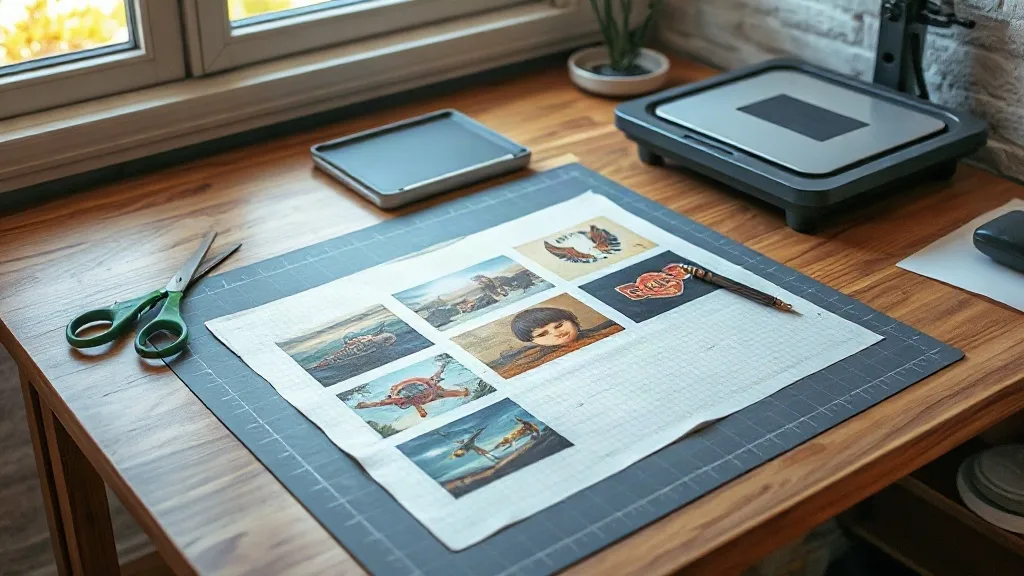
Most small print shops lose money in the gaps, not on the big jobs. It is the half-empty transfer sheet, the ream of wasted film, the twenty minutes spent trimming around a single logo. A DTF Gangsheet is a direct answer to that problem: a single printed sheet that packs many separate designs into one layout, so you pay for the artwork you actually need and skip the dead space. If you run a one-person shop, a craft business, or a side hustle printing shirts for local teams, understanding how gangsheets work changes how you quote, produce, and store your transfers.
What a DTF Gangsheet Actually Is
Direct-to-film printing works by printing your artwork onto a special film, dusting it with adhesive powder, and curing it into a flexible transfer. A gangsheet takes that same process and arranges multiple designs side by side on one continuous sheet. Instead of ordering ten separate transfers, you send one file with ten designs nested together, and the printer outputs a single roll-length sheet.
The practical effect is simple. Film, powder, and press time are shared across every design on the sheet, so your cost per piece drops. The trade-off is that you have to think about layout before you order, because once the sheet is printed, the arrangement is fixed.
How It Differs From Single Transfers
A single transfer is one design on one piece of film, usually with a fixed size and a fixed price. A gangsheet is priced by length or area, which means the same sheet can carry a mix of sizes. A large back print and a dozen small chest logos can share one order without you paying a separate minimum for each.
That flexibility is why gangsheets appeal to shops that sell variety: pet portraits, sports rosters, family reunion shirts, band merch, and small-batch brand drops. You are not forced to commit to one design at volume.
Planning Your Sheet Layout Before You Order
Good gangsheets are designed, not dumped. The difference between a sheet that wastes a third of its area and one that fits neatly comes down to a few minutes of planning.
Nest Designs by Size and Shape
Start with your largest pieces and place them first. Long banners and full-back prints set the frame, and smaller items fill the leftover pockets. Rotate shapes where it makes sense, but keep in mind that text and faces should stay upright for easy inspection.
- Group similar sizes so cutting lines stay clean.
- Leave a small gutter between designs so trimming does not nick a neighbor.
- Keep a consistent margin from the sheet edge for stable feeding.
- Avoid trapping tiny pieces in awkward corners where trimming gets fiddly.
Match Artwork to the Sheet Width
Every printer has a maximum film width. If your design is wider than that, it either gets scaled down or rejected. Check the width before you build the file, and design around it rather than cropping later. A 22-inch sheet handles most chest and sleeve prints comfortably, while full-back designs may need the full width.
Resolution and Color Mode
Send artwork at 300 DPI at final print size, in CMYK where the printer asks for it. Vector files are ideal for logos and text, while photos should be sharpened lightly. Thin white outlines around dark artwork are worth adding on purpose, since the white ink layer is what makes a transfer readable on a black shirt.
Ordering Without Surprises
The most common frustration with gangsheets is a mismatch between what the customer pictured and what arrives. A short checklist prevents most of it.
- Confirm the final print size of each design in inches, not pixels.
- Ask how the sheet is measured and priced, by length or by area.
- Request a proof or a digital preview of the nested layout.
- Double-check spelling on names and numbers before approval.
- Keep a copy of the approved file for reorders.
Names and jersey numbers are where errors hide. Read them aloud against your order list, and have a second person check if you can. Reprinting a gangsheet because one name is misspelled costs more than the five minutes of proofreading.
Pressing and Curing for Clean Results
A transfer is only as good as the press behind it. Temperature, pressure, and peel timing all affect how the design sits on the garment.
Temperature and Pressure Basics
Most DTF films press in the 300 to 320°F range, but follow the supplier's spec sheet rather than a forum post. Pressure should be firm and even, enough that you can see the garment texture through the film but not so heavy that the design spreads. A teflon sheet or parchment cover protects the film from direct heat.
Peel Timing Matters
Cold peel is the safer default for most DTF films. Let the garment cool for a few seconds, then peel smoothly from one corner. Peeling hot can stretch the design or pull fine details. After peeling, a short second press under a cover sheet locks the edges down and improves wash durability.
Fabric Compatibility
DTF adheres well to cotton, polyester, blends, and even some nylon, which is a big part of its appeal. On stretchy fabrics, a slightly lower press temperature and a gentle stretch test after cooling will tell you whether the transfer will hold through wear.
Storage and Inventory Discipline
Printed film is not indestructible. Store sheets flat in a cool, dry place, away from direct sunlight and humidity. Rolling them tightly can crack the cured ink, so a flat drawer or a rigid folder works better. Label each sheet with the design name, size, and print date so you are not guessing six weeks later.
If you sell online, keep a small stock of common sizes on hand and order gangsheets for the rest. This hybrid approach keeps turnaround fast without tying up cash in inventory that may not sell.
When a Gangsheet Makes Sense and When It Does Not
Gangsheets shine when you have variety: mixed sizes, multiple designs, or a batch of personalized items. They are less useful when you need one huge run of a single design, where a dedicated roll order may be cheaper per unit. They also add a planning step, so rush jobs with one design are often faster as a standard transfer.
For a small shop, the sweet spot is usually a weekly or biweekly gangsheet that bundles everything queued up. You build the file once, order once, and press throughout the week. That rhythm keeps costs predictable and reduces the number of small, inefficient orders.
Frequently Asked Questions
How many designs can fit on one DTF Gangsheet?
There is no fixed number. It depends on the size of each design and the sheet dimensions. A sheet packed with small chest logos can hold dozens, while a sheet with full-back prints may hold only a few. Plan by total area, not by count.
Can I mix different garment sizes on the same sheet?
Yes. That is one of the main advantages. You can place youth smalls next to adult extra larges as long as each design is scaled correctly and the layout fits within the sheet width. Just label each piece clearly so pressing does not get mixed up.
How long do DTF transfers last before use?
Stored flat, dry, and out of sunlight, most transfers remain usable for several months. Humidity and heat are the main enemies. If a sheet feels tacky or the powder looks clumped, test one piece before running a full batch.
Do gangsheets work for dark and light shirts alike?
Yes. DTF prints a white ink base under the color layer, so the same transfer reads clearly on black, navy, white, or heather grey. You do not need separate film types for different shirt colors.
What file format should I send for a gangsheet order?
Vector formats like PDF, AI, or SVG are best for logos and text because they scale without blur. High-resolution PNG or TIFF files work for photos at 300 DPI. Always confirm the final print size in inches so the shop can nest the designs accurately.
A Simple Workflow to Start With
Pick one week and try a single gangsheet built around your real orders. Collect every design you need, size each one in inches, nest them with a small gutter, and send the file with a clear size list. Note what fit well and what wasted space. Within two or three cycles, you will have a layout habit that cuts film waste, shortens press time, and makes pricing easier to explain to customers.